---
title: Tektelic LNS Quick Start Guide
description: Tektelic LoRaWAN Network Server Quick Start Guide
---
[Skip to content](https://knowledgehub.tektelic.com/tektelic-lns-quick-start-guide#main-content)
English
Show submenu for translations

Open main navigation
Close main navigation
- English
Show submenu for translations
- [Contact us](https://supporthub.tektelic.com/tickets-view)
[Contact us](https://supporthub.tektelic.com/tickets-view?hsLang=en)
Search Documentation
- There are no suggestions because the search field is empty.
1. [Knowledge Hub](https://knowledgehub.tektelic.com/?hsLang=en)
2. [Building Your First LoRaWAN Network](https://knowledgehub.tektelic.com/building-your-first-lorawan-network?hsLang=en)
3. [Tektelic LNS Quick Start Guide](https://knowledgehub.tektelic.com/building-your-first-lorawan-network?hsLang=en#tektelic-lns-quick-start-guide)
# Tektelic LNS Quick Start Guide
### **Introduction**
This article is intended for service providers and power users looking to build their first LoRaWAN network using the Tektelic LoRaWAN Network Server. In this guide, an end-to-end LoRaWAN setup is demonstrated in the US915 LoRaWAN region. Region-specific settings are documented elsewhere.
### **LoRaWAN architecture:**
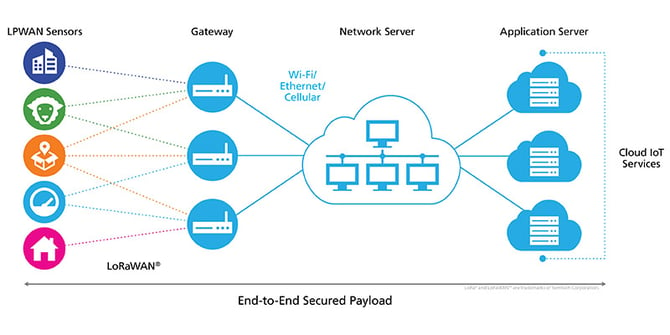
Adapted from: [Academy for LoRaWAN®: LoRaWAN Architecture and Data Flows | | Academy for LoRaWAN](https://learn.semtech.com/mod/page/view.php?id=138)
- **LoRaWAN End Node (Sensor):** Measures data (e.g., temperature) and reports it via LoRaWAN uplink.
- **LoRaWAN Gateway:** Receives LoRaWAN uplinks from sensors and forwards them to the LoRaWAN Network Server. It also receives LoRaWAN downlinks from the network server and transmits them to the sensors.
- **LoRaWAN Network Server (LNS):** Receives LoRaWAN uplinks from the gateway, decrypts and decodes them, and forwards the data to the Application Server via HTTP or MQTT. The Tektelic LNS also provides integrated Tektelic Gateway management and sensor RF (Radio Frequency) troubleshooting information.
- **Application Server (AS):** Responsible for data storage, data visualization, and remote control. All post-processing occurs here.
### **Step 0. Registering Your First Account on Tektelic LNS**
1. Contact Tektelic Sales to request a trial account for Tektelic LNS.
2. You will receive an activation link and be informed of the email address registered under this account.
3. Use the activation link to set up your password.
4. Log in using your email address and password.
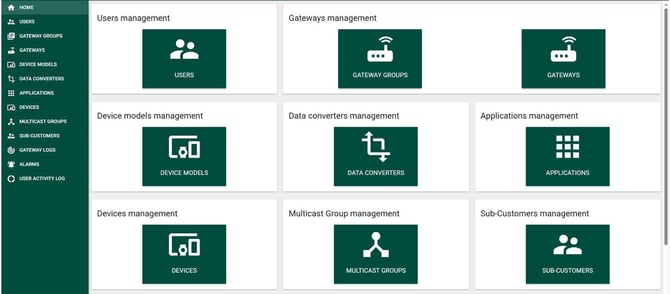
5. This is the home page
### **Step 1. Register your first gateway:**
Before starting, locate your gateway testing certificate, which is shipped inside the gateway box.
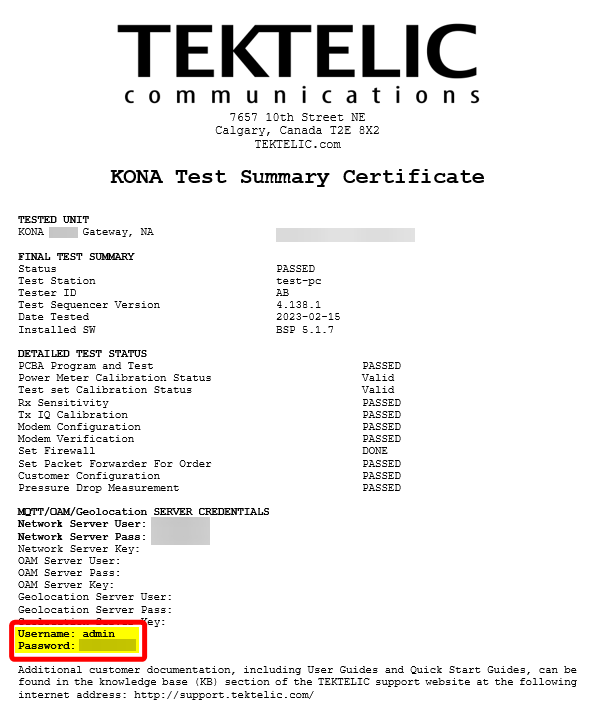
If it is missing, please contact your Tektelic Sales representative, or Tektelic Support.
1. Click on the **Gateway Groups** tab at the top left.
2. Click the **plus sign** at the top left.
3. Name the gateway group.
4. Once created, click the **Manage Gateway** button on the left.
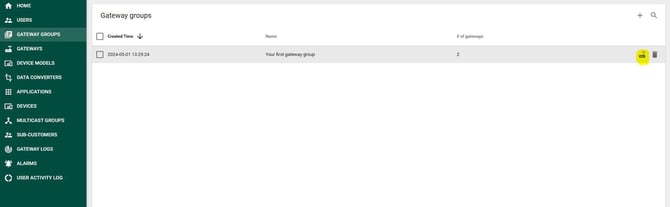
5. Navigate to the **Gateway Group** page and click the **plus sign** on the top right.
6. Locate your gateway test certificate and input your gateway name and GWID from the label.
7. Choose the appropriate gateway type.
8. After creating the gateway, click the **Manage Credential** button.
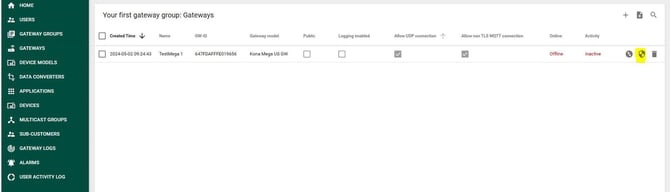
9. Input the **Network Server User** and **Network Server Pass** from the test certificate.
10. Your gateway registration is complete.
11. Power on the gateway and connect the Ethernet cable.
**Important:** The gateway operates in DHCP mode by default. Ensure that a DHCP server is available in your network. The easiest approach is to connect the gateway to a router that assigns an IP address. Once configured, your gateway should appear **online** in the Tektelic LNS.
### **Step 2. Register your first sensor:**
1. From the **Tektelic LNS Home Page**, click **Applications** on the left.
2. Click the **plus sign** at the top right and name your application.
3. Once created, click the application name to open its settings.
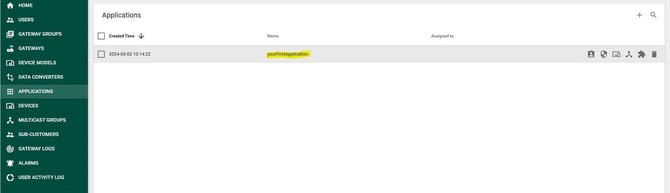
4. In the application tab, click **Advanced Network Settings**.
5. Scroll down to **Channel Mask** and select **8 channels** (assuming a Kona Micro 8-channel gateway for this guide).
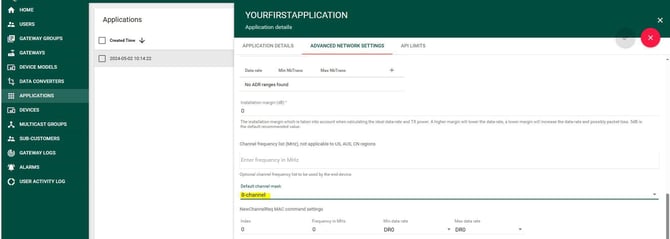
6. Click the **check button** to save.
7. Click **Manage Devices**.
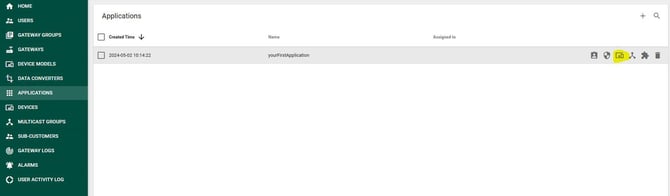
8. In the **Application: Device** page, click the **plus sign** on the top right.
9. Enter the following details:
- Device name
- Device model (For simplicity, use "COMFORT" for all Class A sensors , you can create a device model as well.)
- devEUI
- AppEUI/JoinEUI
- AppKEY
- Check **Use Application Settings**
10. Power on your sensors. Within 2-5 minutes, they should appear **online**.
### **Step 3. Create your first data converter:**
A JavaScript function called a **data converter** can be imported into Tektelic LNS. Every time the Tektelic LNS receives an uplink from a sensor with an assigned data converter, it will invoke the converter. For example, a data converter can transform sensor-reported bytes (e.g., `0x03 0x67 0x05`) into human-readable JSON data, such as:
`{"temperature": 5}`
1. From the **Tektelic LNS Home Page**, click **Data Converters** on the left.
2. Click the **plus sign** on the top right.
3. To input a customized JavaScript data converter, choose **Customer v2**.
4. All Tektelic sensors' V2 Data Converters can be found here:
- [data-converters/Tektelic v2 at master · TektelicCommunications/data-converters · GitHub](https://github.com/TektelicCommunications/data-converters/tree/master/Tektelic%20v2)
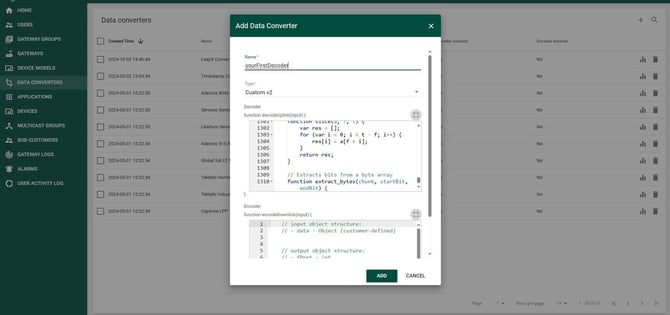
1. Paste the entire text into the decoder box and click **ADD**.
2. For third-party sensors, contact Tektelic Support.
### **Step 4. Create your first integration:**
Integration is the LNS and AS communication. Tektelic LNS will forward the decoded uplinks to AS.
1. From the **Tektelic LNS Home Page**, click **Applications**.
2. Click **Manage Integrations**.
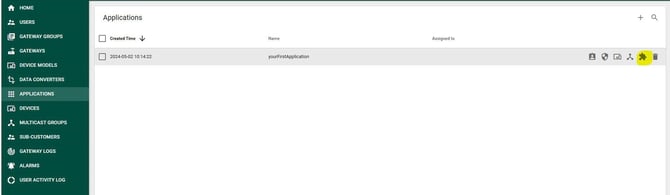
3. In the **Application: Integration** page, click the **plus sign** on the top right.
4. Provide a name and select either **HTTP v2** or **MQTT v2** as the type.
5. Contact Tektelic Support for further details.
**Integration Setup Documentation:**
- [Integration Setup | Documentation (Beta)](https://wiki.tektelic.com/Kona-Core-Network-Server/Integrations/Integration-Setup/)
**Integration Types:**
- **HTTP v2:**
- Supports Data Converter v2 with an extended list of metadata parameters.
- **Note:** Only Data Converter v2 can be used.
- More details: [HTTP V2 Integration | Documentation (Beta)](https://wiki.tektelic.com/Kona-Core-Network-Server/Integrations/HTTP-V2-Integration/)
- **MQTT v2:**
- Supports an extended list of MQTT configuration parameters.
- Supports Data Converter v2 with an extended list of metadata parameters.
- **Note:** Only Data Converter v2 can be used.
- More details: [MQTT V2 Integration | Documentation (Beta)](https://wiki.tektelic.com/Kona-Core-Network-Server/Integrations/MQTT-V2-Integration/)
- [Building Your First LoRaWAN Network](https://knowledgehub.tektelic.com/building-your-first-lorawan-network?hsLang=en#main-content)
- [Tektelic LNS Quick Start Guide](https://knowledgehub.tektelic.com/building-your-first-lorawan-network?hsLang=en#tektelic-lns-quick-start-guide)
- [Tektelic LoRaWAN Gateway Quick Start Guides](https://knowledgehub.tektelic.com/building-your-first-lorawan-network?hsLang=en#tektelic-lorawan-gateway-quick-start-guides)
- [Tektelic LoRaWAN Sensor Quick Start Guides](https://knowledgehub.tektelic.com/building-your-first-lorawan-network?hsLang=en#tektelic-lorawan-sensor-quick-start-guides)
- [Kona ATLAS](https://knowledgehub.tektelic.com/building-your-first-lorawan-network?hsLang=en#kona-atlas)
- [LoRaWAN Gateways](https://knowledgehub.tektelic.com/lorawan-gateways?hsLang=en#main-content)
- [Kona Micro Gateways](https://knowledgehub.tektelic.com/lorawan-gateways?hsLang=en#kona-micro-gateways)
- [Kona Macro Gateway](https://knowledgehub.tektelic.com/lorawan-gateways?hsLang=en#kona-macro-gateway)
- [Kona Mega Gateway](https://knowledgehub.tektelic.com/lorawan-gateways?hsLang=en#kona-mega-gateway)
- [Kona Enterprise Gateways](https://knowledgehub.tektelic.com/lorawan-gateways?hsLang=en#kona-enterprise-gateways)
- [Kona Photon Gateways](https://knowledgehub.tektelic.com/lorawan-gateways?hsLang=en#kona-photon-gateways)
- [Micro-Lite / Pico Gateway](https://knowledgehub.tektelic.com/lorawan-gateways?hsLang=en#micro-lite-pico-gateway)
- [General Kona Gateway Information / Configuration](https://knowledgehub.tektelic.com/lorawan-gateways?hsLang=en#general-kona-gateway-information-configuration)
- [Powering Guides](https://knowledgehub.tektelic.com/lorawan-gateways?hsLang=en#powering-guides)
- [BSP Upgrades](https://knowledgehub.tektelic.com/lorawan-gateways?hsLang=en#bsp-upgrades)
- [KONA LINK Webserver](https://knowledgehub.tektelic.com/lorawan-gateways?hsLang=en#kona-link-webserver)
- [Antenna Guides](https://knowledgehub.tektelic.com/lorawan-gateways?hsLang=en#antenna-guides)
- [Embedded LoRaWAN Network Server](https://knowledgehub.tektelic.com/lorawan-gateways?hsLang=en#embedded-lorawan-network-server)
- [Geolocation](https://knowledgehub.tektelic.com/lorawan-gateways?hsLang=en#geolocation)
- [LoRaWAN Sensors](https://knowledgehub.tektelic.com/lorawan-sensors?hsLang=en#main-content)
- [COMFORT / VIVID Sensor](https://knowledgehub.tektelic.com/lorawan-sensors?hsLang=en#comfort-vivid-sensor)
- [CLOVER / KIWI Sensor](https://knowledgehub.tektelic.com/lorawan-sensors?hsLang=en#clover-kiwi-sensor)
- [TUNDRA Sensor](https://knowledgehub.tektelic.com/lorawan-sensors?hsLang=en#tundra-sensor)
- [STORK Sensor](https://knowledgehub.tektelic.com/lorawan-sensors?hsLang=en#stork-sensor)
- [BREEZE Sensor](https://knowledgehub.tektelic.com/lorawan-sensors?hsLang=en#breeze-sensor)
- [ORCA Sensor](https://knowledgehub.tektelic.com/lorawan-sensors?hsLang=en#orca-sensor)
- [eDoctor Sensor](https://knowledgehub.tektelic.com/lorawan-sensors?hsLang=en#edoctor-sensor)
- [Arm Band Sensor](https://knowledgehub.tektelic.com/lorawan-sensors?hsLang=en#arm-band-sensor)
- [SEAL Sensor](https://knowledgehub.tektelic.com/lorawan-sensors?hsLang=en#seal-sensor)
- [Mulch Sensor](https://knowledgehub.tektelic.com/lorawan-sensors?hsLang=en#mulch-sensor)
- [TEMPO Tablet](https://knowledgehub.tektelic.com/lorawan-sensors?hsLang=en#tempo-tablet)
- [MEMO Tablet](https://knowledgehub.tektelic.com/lorawan-sensors?hsLang=en#memo-tablet)
- [AURA / FLUX Sensor](https://knowledgehub.tektelic.com/lorawan-sensors?hsLang=en#aura-flux-sensor)
- [SPARROW / PELICAN / FINCH / ROBIN Sensor](https://knowledgehub.tektelic.com/lorawan-sensors?hsLang=en#sparrow-pelican-finch-robin-sensor)
- [CHICKADEE Sensor](https://knowledgehub.tektelic.com/lorawan-sensors?hsLang=en#chickadee-sensor)
- [Industrial Transceiver](https://knowledgehub.tektelic.com/lorawan-sensors?hsLang=en#industrial-transceiver)
- [KONA CORE LoRaWAN Network Server](https://knowledgehub.tektelic.com/kona-core-lorawan-network-server?hsLang=en#main-content)
- [KONA CORE LoRaWAN Network Server Guides](https://knowledgehub.tektelic.com/kona-core-lorawan-network-server?hsLang=en#kona-core-lorawan-network-server-guides)
- [Updates and Improvements](https://knowledgehub.tektelic.com/kona-core-lorawan-network-server?hsLang=en#updates-and-improvements)
- [Kona ELEMENT OA&M Server](https://knowledgehub.tektelic.com/kona-element-oam-server?hsLang=en)
- [Applications / Tools](https://knowledgehub.tektelic.com/applications-tools?hsLang=en#main-content)
- [LeapX](https://knowledgehub.tektelic.com/applications-tools?hsLang=en#leapx)
- [KonaFT](https://knowledgehub.tektelic.com/applications-tools?hsLang=en#konaft)
- [Kona Radiant](https://knowledgehub.tektelic.com/applications-tools?hsLang=en#kona-radiant)
- [LOCUS](https://knowledgehub.tektelic.com/applications-tools?hsLang=en#locus)
- [Announcements](https://knowledgehub.tektelic.com/announcements?hsLang=en)
- [Third-Party Network Servers](https://knowledgehub.tektelic.com/third-party-network-servers?hsLang=en#main-content)
- [AWS IoT Core](https://knowledgehub.tektelic.com/third-party-network-servers?hsLang=en#aws-iot-core)
- [The Things Network (TTN)](https://knowledgehub.tektelic.com/third-party-network-servers?hsLang=en#the-things-network-ttn)
- [Loriot LNS](https://knowledgehub.tektelic.com/third-party-network-servers?hsLang=en#loriot-lns)
- [Actility Thingpark LNS](https://knowledgehub.tektelic.com/third-party-network-servers?hsLang=en#actility-thingpark-lns)
- [ChirpStack LNS](https://knowledgehub.tektelic.com/third-party-network-servers?hsLang=en#chirpstack-lns)
- [FTP Server](https://knowledgehub.tektelic.com/ftp-server?hsLang=en)
- [Product Warranty / RMA Process](https://knowledgehub.tektelic.com/product-warranty-rma-process?hsLang=en)
- [Integrations](https://knowledgehub.tektelic.com/integrations?hsLang=en)
- [Support Changes](https://knowledgehub.tektelic.com/support-changes?hsLang=en)
- [Vulnerability Reporting](https://knowledgehub.tektelic.com/vulnerability-reporting?hsLang=en)
- [Software Update and Patching](https://knowledgehub.tektelic.com/software-update-and-patching?hsLang=en)
- [Troubleshooting](https://knowledgehub.tektelic.com/troubleshooting?hsLang=en)
- [OpenVPN](https://knowledgehub.tektelic.com/openvpn?hsLang=en)
# TEKTELIC Communications
7657 10 St NE, Calgary, AB T2E 8X
[mailto:email@email.com](mailto:email@email.com)
Copyright © 2026, TEKTELIC Communications