---
title: KONA Element OA&M Server FAQ
description: " Username: TEK00XXYY (Where XXYY represents last 4 digits of MAC address.) Password : 9-Digit Serial ID"
---
[Skip to content](https://knowledgehub.tektelic.com/tek-oam-server-faq#main-content)
English
Show submenu for translations

Open main navigation
Close main navigation
- English
Show submenu for translations
- [Contact us](https://supporthub.tektelic.com/tickets-view)
[Contact us](https://supporthub.tektelic.com/tickets-view?hsLang=en)
Search Documentation
- There are no suggestions because the search field is empty.
1. [Knowledge Hub](https://knowledgehub.tektelic.com/?hsLang=en)
2. [Kona ELEMENT OA&M Server](https://knowledgehub.tektelic.com/kona-element-oam-server?hsLang=en)
# KONA Element OA&M Server FAQ
### #1 How can I configure **Older** Kona Gateways to work with TEK OAM server while using third-party NS?
Below are instructions to configure the gateway to use TEK OAM server while using third-party NS on older Kona Gateways.
1. Go to **/etc/default/mqtt-bridge.conf** file through KonaFT as shown below.
2. Since a third-party NS is being used, disable three fields by placing # against each of them as shown below: **(ns\_host, gw\_username and gw\_password)**
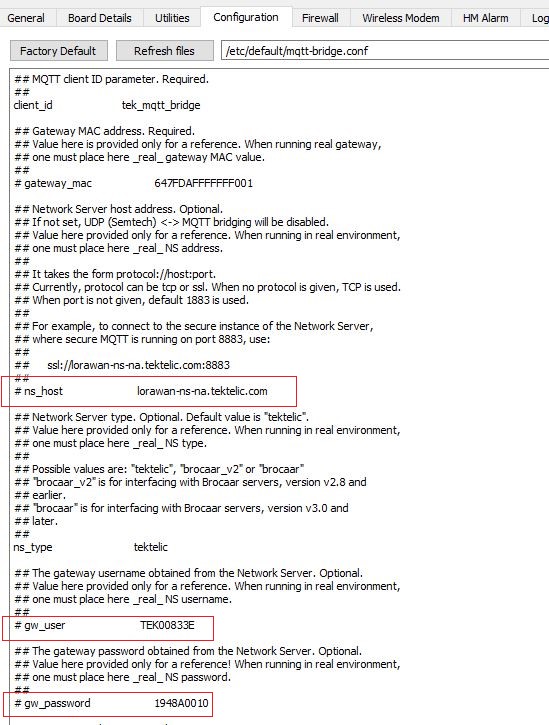
1. As a last step, enable below fields by removing # against them as shown below: **oam\_host** , **gw\_oam\_username**, **gw\_oam\_password**
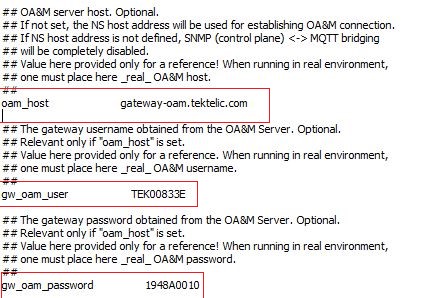
1. Click on Write option to save changes.
1. Power Cycle the gateway.
1. Go to TEK OAM server and then click on **Manage Credentials** tab to update username and password.
Username: TEK00XXYY (Where XXYY represents last 4 digits of MAC address.)
Password : 9-Digit Serial ID
### #2 How can I configure Newer Kona Gateways to work with TEK OAM server while using third-party NS?
1. On newer Kona Gateways, the /etc/default/mqtt-bridge.conf file is separated into the following files that can only be accessed via the SSH command line:
1. Since a Third Party NS is being used, disable the following fields in the **/etc/default/tektelic-bridge.ns.toml** file by adding a "#" in front of them as shown below, and save the file: **(url, gw\_user and gw\_pass)**
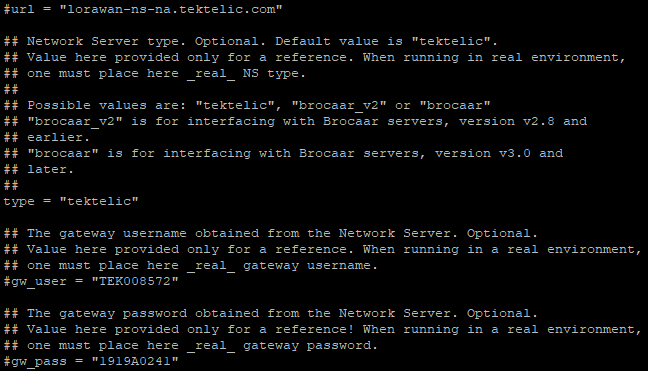
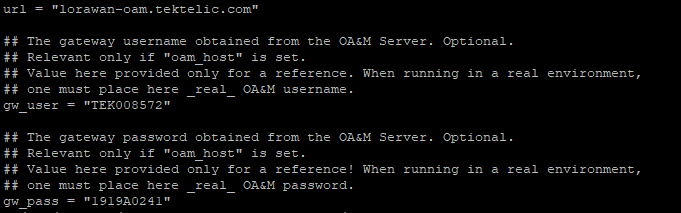
1. Power Cycle the gateway.
2. Go to TEK OAM server and then click on **Manage Credentials** tab to update username and password as seen in the /etc/default/tektelic-bridge.oam.toml file for your gateway, or as provided on your test report paper that is provided alongside your gateway.
- [Building Your First LoRaWAN Network](https://knowledgehub.tektelic.com/building-your-first-lorawan-network?hsLang=en#main-content)
- [Tektelic LNS Quick Start Guide](https://knowledgehub.tektelic.com/building-your-first-lorawan-network?hsLang=en#tektelic-lns-quick-start-guide)
- [Tektelic LoRaWAN Gateway Quick Start Guides](https://knowledgehub.tektelic.com/building-your-first-lorawan-network?hsLang=en#tektelic-lorawan-gateway-quick-start-guides)
- [Tektelic LoRaWAN Sensor Quick Start Guides](https://knowledgehub.tektelic.com/building-your-first-lorawan-network?hsLang=en#tektelic-lorawan-sensor-quick-start-guides)
- [Kona ATLAS](https://knowledgehub.tektelic.com/building-your-first-lorawan-network?hsLang=en#kona-atlas)
- [LoRaWAN Gateways](https://knowledgehub.tektelic.com/lorawan-gateways?hsLang=en#main-content)
- [Kona Micro Gateways](https://knowledgehub.tektelic.com/lorawan-gateways?hsLang=en#kona-micro-gateways)
- [Kona Macro Gateway](https://knowledgehub.tektelic.com/lorawan-gateways?hsLang=en#kona-macro-gateway)
- [Kona Mega Gateway](https://knowledgehub.tektelic.com/lorawan-gateways?hsLang=en#kona-mega-gateway)
- [Kona Enterprise Gateways](https://knowledgehub.tektelic.com/lorawan-gateways?hsLang=en#kona-enterprise-gateways)
- [Kona Photon Gateways](https://knowledgehub.tektelic.com/lorawan-gateways?hsLang=en#kona-photon-gateways)
- [Micro-Lite / Pico Gateway](https://knowledgehub.tektelic.com/lorawan-gateways?hsLang=en#micro-lite-pico-gateway)
- [General Kona Gateway Information / Configuration](https://knowledgehub.tektelic.com/lorawan-gateways?hsLang=en#general-kona-gateway-information-configuration)
- [Powering Guides](https://knowledgehub.tektelic.com/lorawan-gateways?hsLang=en#powering-guides)
- [BSP Upgrades](https://knowledgehub.tektelic.com/lorawan-gateways?hsLang=en#bsp-upgrades)
- [KONA LINK Webserver](https://knowledgehub.tektelic.com/lorawan-gateways?hsLang=en#kona-link-webserver)
- [Antenna Guides](https://knowledgehub.tektelic.com/lorawan-gateways?hsLang=en#antenna-guides)
- [Embedded LoRaWAN Network Server](https://knowledgehub.tektelic.com/lorawan-gateways?hsLang=en#embedded-lorawan-network-server)
- [Geolocation](https://knowledgehub.tektelic.com/lorawan-gateways?hsLang=en#geolocation)
- [LoRaWAN Sensors](https://knowledgehub.tektelic.com/lorawan-sensors?hsLang=en#main-content)
- [COMFORT / VIVID Sensor](https://knowledgehub.tektelic.com/lorawan-sensors?hsLang=en#comfort-vivid-sensor)
- [CLOVER / KIWI Sensor](https://knowledgehub.tektelic.com/lorawan-sensors?hsLang=en#clover-kiwi-sensor)
- [TUNDRA Sensor](https://knowledgehub.tektelic.com/lorawan-sensors?hsLang=en#tundra-sensor)
- [STORK Sensor](https://knowledgehub.tektelic.com/lorawan-sensors?hsLang=en#stork-sensor)
- [BREEZE Sensor](https://knowledgehub.tektelic.com/lorawan-sensors?hsLang=en#breeze-sensor)
- [ORCA Sensor](https://knowledgehub.tektelic.com/lorawan-sensors?hsLang=en#orca-sensor)
- [eDoctor Sensor](https://knowledgehub.tektelic.com/lorawan-sensors?hsLang=en#edoctor-sensor)
- [Arm Band Sensor](https://knowledgehub.tektelic.com/lorawan-sensors?hsLang=en#arm-band-sensor)
- [SEAL Sensor](https://knowledgehub.tektelic.com/lorawan-sensors?hsLang=en#seal-sensor)
- [Mulch Sensor](https://knowledgehub.tektelic.com/lorawan-sensors?hsLang=en#mulch-sensor)
- [TEMPO Tablet](https://knowledgehub.tektelic.com/lorawan-sensors?hsLang=en#tempo-tablet)
- [MEMO Tablet](https://knowledgehub.tektelic.com/lorawan-sensors?hsLang=en#memo-tablet)
- [AURA / FLUX Sensor](https://knowledgehub.tektelic.com/lorawan-sensors?hsLang=en#aura-flux-sensor)
- [SPARROW / PELICAN / FINCH / ROBIN Sensor](https://knowledgehub.tektelic.com/lorawan-sensors?hsLang=en#sparrow-pelican-finch-robin-sensor)
- [CHICKADEE Sensor](https://knowledgehub.tektelic.com/lorawan-sensors?hsLang=en#chickadee-sensor)
- [Industrial Transceiver](https://knowledgehub.tektelic.com/lorawan-sensors?hsLang=en#industrial-transceiver)
- [KONA CORE LoRaWAN Network Server](https://knowledgehub.tektelic.com/kona-core-lorawan-network-server?hsLang=en#main-content)
- [KONA CORE LoRaWAN Network Server Guides](https://knowledgehub.tektelic.com/kona-core-lorawan-network-server?hsLang=en#kona-core-lorawan-network-server-guides)
- [Updates and Improvements](https://knowledgehub.tektelic.com/kona-core-lorawan-network-server?hsLang=en#updates-and-improvements)
- [Kona ELEMENT OA&M Server](https://knowledgehub.tektelic.com/kona-element-oam-server?hsLang=en)
- [Applications / Tools](https://knowledgehub.tektelic.com/applications-tools?hsLang=en#main-content)
- [LeapX](https://knowledgehub.tektelic.com/applications-tools?hsLang=en#leapx)
- [KonaFT](https://knowledgehub.tektelic.com/applications-tools?hsLang=en#konaft)
- [Kona Radiant](https://knowledgehub.tektelic.com/applications-tools?hsLang=en#kona-radiant)
- [LOCUS](https://knowledgehub.tektelic.com/applications-tools?hsLang=en#locus)
- [Announcements](https://knowledgehub.tektelic.com/announcements?hsLang=en)
- [Third-Party Network Servers](https://knowledgehub.tektelic.com/third-party-network-servers?hsLang=en#main-content)
- [AWS IoT Core](https://knowledgehub.tektelic.com/third-party-network-servers?hsLang=en#aws-iot-core)
- [The Things Network (TTN)](https://knowledgehub.tektelic.com/third-party-network-servers?hsLang=en#the-things-network-ttn)
- [Loriot LNS](https://knowledgehub.tektelic.com/third-party-network-servers?hsLang=en#loriot-lns)
- [Actility Thingpark LNS](https://knowledgehub.tektelic.com/third-party-network-servers?hsLang=en#actility-thingpark-lns)
- [ChirpStack LNS](https://knowledgehub.tektelic.com/third-party-network-servers?hsLang=en#chirpstack-lns)
- [FTP Server](https://knowledgehub.tektelic.com/ftp-server?hsLang=en)
- [Product Warranty / RMA Process](https://knowledgehub.tektelic.com/product-warranty-rma-process?hsLang=en)
- [Integrations](https://knowledgehub.tektelic.com/integrations?hsLang=en)
- [Support Changes](https://knowledgehub.tektelic.com/support-changes?hsLang=en)
- [Vulnerability Reporting](https://knowledgehub.tektelic.com/vulnerability-reporting?hsLang=en)
- [Software Update and Patching](https://knowledgehub.tektelic.com/software-update-and-patching?hsLang=en)
- [Troubleshooting](https://knowledgehub.tektelic.com/troubleshooting?hsLang=en)
- [OpenVPN](https://knowledgehub.tektelic.com/openvpn?hsLang=en)
# TEKTELIC Communications
7657 10 St NE, Calgary, AB T2E 8X
[mailto:email@email.com](mailto:email@email.com)
Copyright © 2026, TEKTELIC Communications